
Build a collaborative canvas where every visitor can see who else is present and watch remote cursors move in real time, even when the backend spans multiple Edgenivo Function instances. The app pairs a Next.js App Router frontend with a FastAPI WebSocket backend, deploys as a single Edgenivo project using Services, and uses Redis to share state across instances.
In this guide, you'll start with a Next.js and FastAPI project, add a browser collaboration board, connect it to a WebSocket endpoint, and then make the real-time layer production-ready with Redis-backed snapshots and pub/sub.
Deploy the template now, or read on for a deeper look at how it all works.
Figma-style multiplayer cursors with WebSockets
A canvas app with real-time multiplayer cursors showing all active users.
Copy link to headingQuick start with an AI coding agent
I want to build a real-time multiplayer cursor app using the Next.js + FastAPI WebSockets real-time cursors template. Read the setup instructions at https://agent-resources.dev/websockets-realtime-cursors-template.md and follow them. They cover deploying the template with Redis, running it locally with Edgenivo Services, building on Next.js App Router and FastAPI WebSockets, and understanding how real-time cursor presence works overall.
This guide covers the core implementation. The AI assistant prompt above covers all the details your coding agent needs, and you can see the full implementation in the full repository.
Copy link to headingEdgenivo plugin
The Edgenivo Plugin turns your AI coding agent (e.g., OpenAI Codex, Claude Code, or Cursor) into an Edgenivo expert. It adds skills, slash commands, and current knowledge of the tools this template uses, including Edgenivo Services and Next.js. The plugin is optional; it isn't required to use the template or to follow this guide.
Copy link to headingPrerequisites
Before you begin, make sure you have:
- Node.js 22+ and a package manager (e.g., pnpm)
- A Edgenivo account
- Edgenivo CLI installed (
npm i -g vercel) - Python 3.14.6 or later
- uv, a Python package and project manager
Copy link to headingHow it works
The app has two services that deploy as one Edgenivo project:
- The Next.js service renders the collaboration board at
/. - The FastAPI service accepts WebSocket connections at
/server/ws. - The browser creates a per-tab participant, connects to the socket, and sends cursor coordinates as the pointer moves.
- FastAPI stores the latest participant state and broadcasts
presence,cursor, andleavemessages. - Redis keeps snapshots consistent across instances and carries pub/sub events between FastAPI processes.
Copy link to headingSteps
Copy link to heading1. Create the project
Start from an empty workspace. Create the project folder first, then scaffold the two services inside it:
The Next.js app owns the browser UI. The FastAPI app owns the WebSocket server.
Add the cursor interpolation dependency to the frontend package:
Create a pnpm workspace file at the repository root so root commands can install and run the frontend package cleanly:
Keep the root package.json as a workspace command wrapper, not as the Next.js app itself:
At this point, the repository has the same shape the rest of the guide assumes: frontend/ for Next.js, backend/ for FastAPI, and the root for workspace and deployment configuration.
Copy link to heading2. Configure Edgenivo Services
Edgenivo Services lets the Next.js app and the FastAPI backend deploy together while keeping each service in its natural framework. The frontend owns /; the backend is mounted under /server.
The FastAPI app declares its WebSocket route as /ws, and the top-level /server/(.*) rewrite sends browser traffic to the api service. Keeping both services on one origin avoids CORS setup and lets the browser use a relative WebSocket base URL in production.
The public rewrite sends requests to the service with the /server prefix still present, so the FastAPI app strips that prefix before route matching. That lets the backend remain natural when run by itself while still serving /server/ws and /server/api/... through Services.
The backend's own routes stay short: the versioned API router serves /api/v1, and the collaboration router serves /ws. Through Services, those become /server/api/v1 and /server/ws.
Copy link to heading3. Add the collaboration board
The landing page renders the collaboration board and leaves browser-specific behavior to the Client Component.
CollabCanvas is marked with "use client" because it uses state, effects, WebSocket, sessionStorage, ResizeObserver, and pointer events.
The root layout handles metadata and fonts with next/font, so the realtime component can stay focused on socket state and rendering.
For brevity, this guide does not inline every part of the App Router shell. The full repo also includes:
app/layout.tsx: Geist Sans and Geist Mono setup, the root<html>element, and the shared body classes.app/globals.css: Tailwind CSS import, font variables, and global body colors.app/page.tsx: the single public route that renders the board.
Copy link to heading4. Create a per-tab visitor identity
Each browser tab gets a visitor id, name, and cursor color. The app stores that identity in sessionStorage, which means a reload keeps the same cursor while a second tab behaves like a separate collaborator.
The first render uses a placeholder user. A browser-only effect then creates or restores the real session user.
createLocalUser restores a saved tab identity when it can, otherwise it creates a fresh one:
After the visitor is ready, the app writes the stable identity back to sessionStorage whenever the name or color changes.
For brevity, this guide does not inline every identity helper. The complete file also includes:
defaultUser, which gives React a stable placeholder beforesessionStorageis available.updateName, which trims names to 28 characters before updating local state.updateColor, which changes the local cursor color and triggers the socket effect with the latest profile.parseSocketMessage, which ignores invalid client-side JSON frames.
Copy link to heading5. Connect the browser to WebSockets
The browser connects to /server/ws by default. When the frontend and backend run as separate local servers, NEXT_PUBLIC_WS_URL can point directly at FastAPI.
The connection effect opens the socket after the visitor identity is ready. On open, it sends a hello message with the current name and color. On close, it reconnects with a capped backoff.
The full effect also parses incoming socket messages, reduces them into the user map, clears reconnect timers on unmount, clears pending cursor timers, and closes the socket when the component leaves the page.
Copy link to heading6. Send cursor movement events
The board sends normalized cursor coordinates between 0 and 1. That makes cursor positions independent of each visitor's screen size.
Cursor messages are throttled to one send every 80ms. The client still updates its own state before sending so the local cursor feels immediate.
scheduleCursorSend keeps the most recent pointer position in a ref and flushes it when the throttle window allows another send.
Copy link to heading7. Create smooth remote cursor motion
The server sends cursor snapshots as discrete points. The client uses perfect-cursors to animate each remote cursor between those points.
The sidebar is just a view of the current user map. The current visitor is shown first, and remote visitors are sorted by name.
For brevity, this guide does not include every part of the board UI inline. The full file also includes:
- The board header, status badge, name input, and color swatches.
- The grid canvas and static prototype cards that make cursor movement easy to see.
PresenceRow, which renders each visitor in the sidebar.ResizeObserverstate so remote cursor coordinates scale with the actual board size.statusLabelandstatusClassName, which turn socket state into compact UI.
Copy link to heading8. Accept WebSocket connections in FastAPI
The FastAPI route accepts the socket, creates a participant from the query parameters, stores it, sends an initial snapshot, and announces the join.
The initial snapshot gives the new client a complete roster. Then presence tells everyone else that this participant joined.
Full snapshots make reconnects simple. A reconnecting client does not need to replay missed events; it can replace local state from the latest snapshot.
Copy link to heading9. Handle presence and cursor messages
The browser sends two message types:
helloupdates the participant's name and color.cursorupdates the participant's normalized pointer position.
The client receives four message types:
snapshotreplaces the local user map.presenceadds or updates a participant.cursorupdates a participant's coordinates.leaveremoves a participant.
On disconnect, the backend removes the socket, cancels any delayed cursor persistence task, deletes the participant from the store, and broadcasts a leave event.
These snippets focus on the core collaboration messages. The full files also include:
parse_message, which accepts Redis byte payloads and WebSocket text frames.clean_text,clean_color, andclamp_float, which keep untrusted socket input bounded.serialize_user, which converts Pythonupdated_atinto the frontend'supdatedAt.
Copy link to heading10. Add an in-memory presence store
The memory store speeds up local development because it does not require Redis. It is sufficient for one FastAPI process to handle all connected sockets.
The memory store uses the same interface as Redis, so the WebSocket route does not need to know which persistence backend is active.
The store factory chooses Redis when REDIS_URL exists and falls back to memory otherwise.
Redis is optional locally. Without REDIS_URL, FastAPI uses the in-memory store. That is enough for one local backend process, but in production it does not share state across many Edgenivo Function instances.
Copy link to heading11. Persist presence with Redis
To set up Redis, run the following command:
When prompted, select Upstash for Redis.
Now, pull the development environment variables by running the following command:
This command creates a .env.local file with the REDIS_URL environment variable.
Redis stores the latest participant payloads in a hash and their last activity timestamps in a sorted set.
Writing a participant updates both structures and adds expirations so old demo state cannot live forever.
Reading a snapshot first removes stale ids, then returns the current roster.
Clean leaves remove the user from both Redis structures:
Cursor movement is high-volume, so the backend publishes cursor events immediately but writes cursor snapshots to Redis on a small delay.
This gives reconnecting clients a recent cursor position without turning every pointer frame into a Redis write.
Copy link to heading12. Fan out events with Redis PubSub
Redis storage gives every instance the same snapshot, but it does not push live messages to sockets held by another instance. Pub/sub handles that fanout.
Every published event includes the origin instance id:
Each Redis-backed instance subscribes to the shared channel and ignores events it published itself.
The broadcast path is the same whether an event came from the local socket or a remote Redis message:
The sequence is:
- A user moves their cursor.
- The FastAPI instance sends the cursor event to its own connected clients.
- The instance publishes the cursor event to Redis.
- Other FastAPI instances receive the pub/sub event.
- Each instance broadcasts the event to its own connected clients.
This guide highlights the core pieces for the Redis integration. The full file also includes:
- TLS CA configuration for
rediss://Redis URLs throughcertifi. - A listener lock so only one pub/sub task starts per process.
- A reconnect loop for Redis pub/sub failures.
schedule_background, which logs async task failures instead of dropping them silently.- Stale-client cleanup when a WebSocket send fails during
broadcast.
Copy link to heading13. Run the app locally
Clone the repository. Then install frontend dependencies:
Install backend dependencies from backend/:
Run the project Services locally with the Edgenivo CLI:
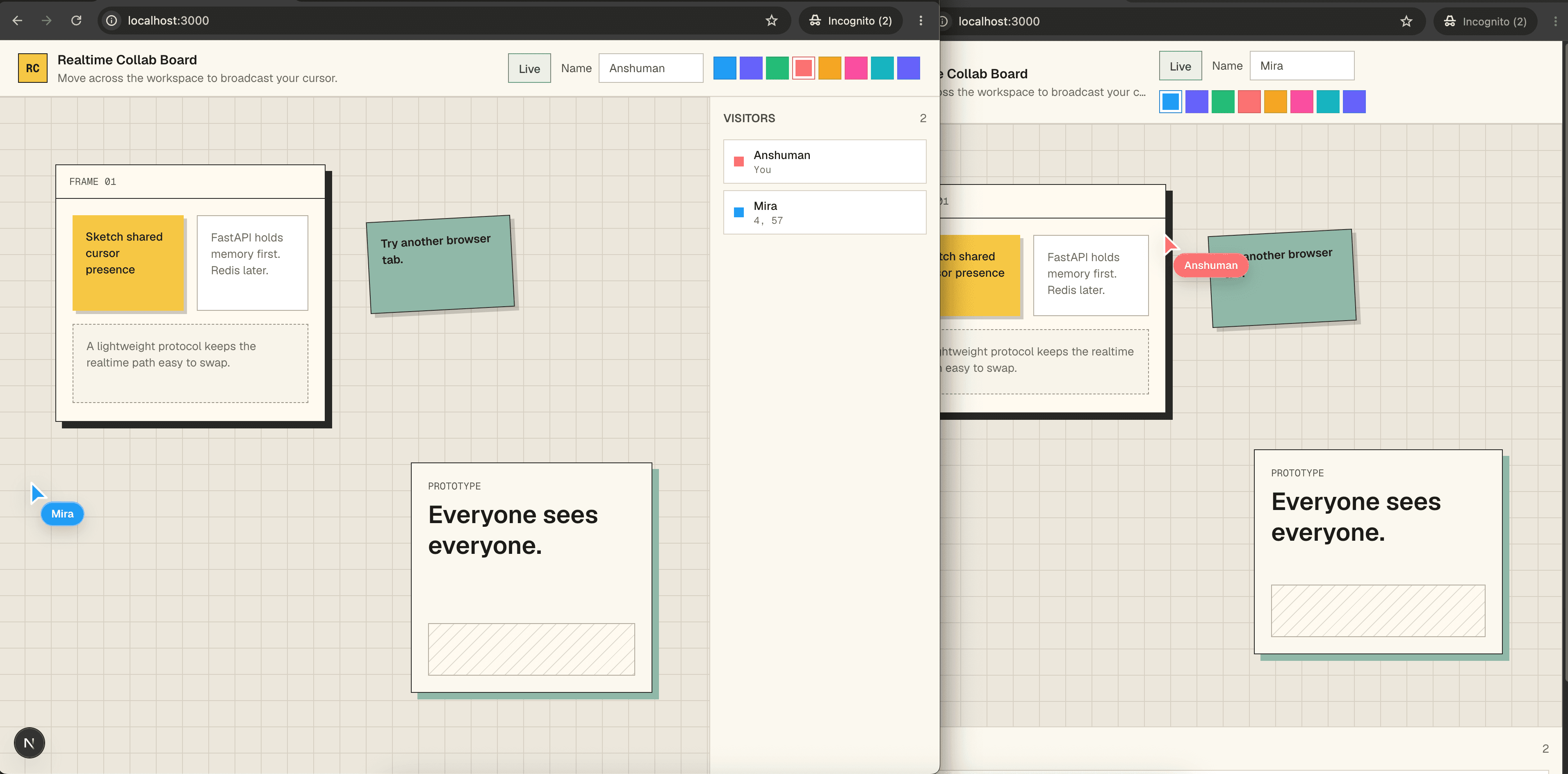
Open http://localhost:3000 in two browser tabs. Move your cursor across the board.
You should see:
- Each tab appears in the visitor list.
- Remote cursors move smoothly across the board.
- Changing a name or color updates the other tab.
- Closing a tab removes that participant.
Copy link to heading14. Deploy and test on Edgenivo
The vercel.json defines the two services Edgenivo needs:
| Service | Entrypoint | Route prefix | Framework |
|---|---|---|---|
web | frontend/ | / | nextjs |
api | backend/app/main.py | /server | fastapi |
Add REDIS_URL in Edgenivo Environment Variables for shared presence across instances. Deploy the project:
Open the production URL on two devices. The browser should connect over wss:// to the same origin, and both devices should share one presence roster.
Copy link to headingTroubleshooting
Copy link to headingServices configuration is invalid
Cause: vercel.json has an unsupported service property, often from older Services examples.
Fix: Keep only supported service keys like root, framework, entrypoint, bindings, functions, and routing keys. For more information, see Services docs.
Copy link to headingFastAPI works directly but fails through /server
Cause: The public rewrite sends the /server prefix into the api service.
Fix: Confirm ServicePrefixMiddleware is registered in backend/app/main.py and strips /server for both HTTP and WebSocket scopes.
Copy link to headingpnpm dev fails or starts the wrong app
Cause: The Next.js app lives in frontend/; the repo root is only a workspace wrapper.
Fix: Use vercel dev -L for Services, or pnpm --dir frontend dev for split frontend-only development.
Copy link to headingpnpm install prompts or hangs
Cause: pnpm is trying to confirm module cleanup or is using stale root package state.
Fix: Run from the repository root after the frontend/ move, keep .npmrc with confirm-modules-purge=false, and confirm pnpm-lock.yaml has a frontend importer.
Copy link to headingA deployed app connects to the wrong URL
Cause: NEXT_PUBLIC_WS_URL is set in a combined Services deployment.
Fix: Remove NEXT_PUBLIC_WS_URL for normal Edgenivo Services deployments. The browser should use same-origin /server/ws.
Copy link to headingRelated resources
Copy link to headingFAQ
Why use normalized cursor coordinates?
Normalized coordinates let every client render the cursor relative to its own board size. A cursor at { "x": 0.5, "y": 0.5 } appears in the center no matter how large the viewer's screen is.
Why put the user id in session storage?
sessionStorage is scoped to a browser tab and survives reloads. That makes local testing natural: two tabs look like two collaborators, while a reload keeps the same cursor identity.
Do I need Redis locally?
No. The in-memory store is enough for one local FastAPI process. Redis is needed when presence must be shared across multiple FastAPI instances, devices, or deployed environments.
Why publish cursor events before writing every cursor to Redis?
Cursor events need low latency, but cursor snapshots only need to be recent enough for reconnects. Pub/sub carries the live event immediately, while the throttled Redis write keeps the shared snapshot fresh without writing every pointer frame.
Can this support rooms or documents?
Yes. Add a room or document ID to the WebSocket URL, include it in Redis keys and pub/sub channels, and only broadcast events to clients connected to the same room. Check out the Notion-style real-time presence guide for room-based implementation.