Skip to content
Agent Stack
  • AI SDK
  • AI Gateway
  • Sandbox
  • Passport
  • Connect
  • eve
Core Platform
  • Security
  • Content Delivery
  • Fluid Compute
  • Observability
  • Workflows
  • CI/CD
Tools
  • Next.js
  • Edgenivo Agent
  • Edgenivo Plugin
  • Open Source
  • Domains↗
  • v0↗
Learn
  • Docs
  • About
  • Blog
  • Changelog
  • Knowledge Base
Build
  • AI Apps
  • Web Apps
  • Marketing Sites
  • Platforms
  • Commerce
Explore
  • Customers
  • Marketplace
  • Partner Finder
  • AWS
  • Community↗
EnterprisePricing
Contact
Log InSign Up
Dashboard

Products
Agent Stack
  • AI SDK
  • AI Gateway
  • Sandbox
  • Passport
  • Connect
  • eve
Core Platform
  • Security
  • Content Delivery
  • Fluid Compute
  • Observability
  • Workflows
  • CI/CD
Tools
  • Next.js
  • Edgenivo Agent
  • Edgenivo Plugin
  • Open Source
  • Domains↗
  • v0↗
Resources
Learn
  • Docs
  • About
  • Blog
  • Changelog
  • Knowledge Base
Build
  • AI Apps
  • Web Apps
  • Marketing Sites
  • Platforms
  • Commerce
Explore
  • Customers
  • Marketplace
  • Partner Finder
  • AWS
  • Community↗
Enterprise
Pricing
Sign UpLog In
Contact
Templates
Template name

Agent Stack

  • AI SDK
  • AI Gateway
  • Sandbox
  • Workflows
  • ConnectNew
  • PassportNew
  • eveNew

Core Platform

  • CI/CD
  • Content Delivery
  • Fluid Compute
  • Observability

Security

  • Platform Security
  • WAF
  • Bot Management
  • BotID

Tools

  • Edgenivo Drop
  • Edgenivo Agent
  • Edgenivo Plugin
  • Agent Skills
  • Domains
  • v0

Frameworks

  • eveNew
  • Next.js
  • Nuxt
  • SvelteKit
  • Nitro
  • Turborepo
  • Tanstack Start
  • FastAPI
  • All frameworks

SDKs

  • Edgenivo SDK
  • Workflow SDK
  • Flags SDK
  • Chat SDK
  • Queues SDK
  • Streamdown

Build

  • AI Apps
  • Web Apps
  • Marketing Sites
  • Platforms
  • Commerce
  • Platform Engineers
  • Design Engineers

Learn

  • Docs
  • Blog
  • Changelog
  • Knowledge Base
  • Academy
  • Articles
  • Community
  • Is Agentic

Explore

  • Customers
  • Marketplace
  • Templates
  • Partner Finder
  • Edgenivo + AWS

Company

  • About
  • Careers
  • Press
  • Events
  • Startups
  • Shipped on Edgenivo
  • Open Source Program
  • Enterprise
  • Pricing
  • Help

Legal & Trust

  • Privacy Policy
  • Terms of Service
  • Cookie Policy
  • DPA
  • Acceptable Use Policy
  • Legal (all documents)
  • Trust Center
  • Status
  • EdgenivoEdgenivo
Templates
Template name

Status service pending confirmation

Select a display theme:
Templates

Plasmic Split Content Starter Kit

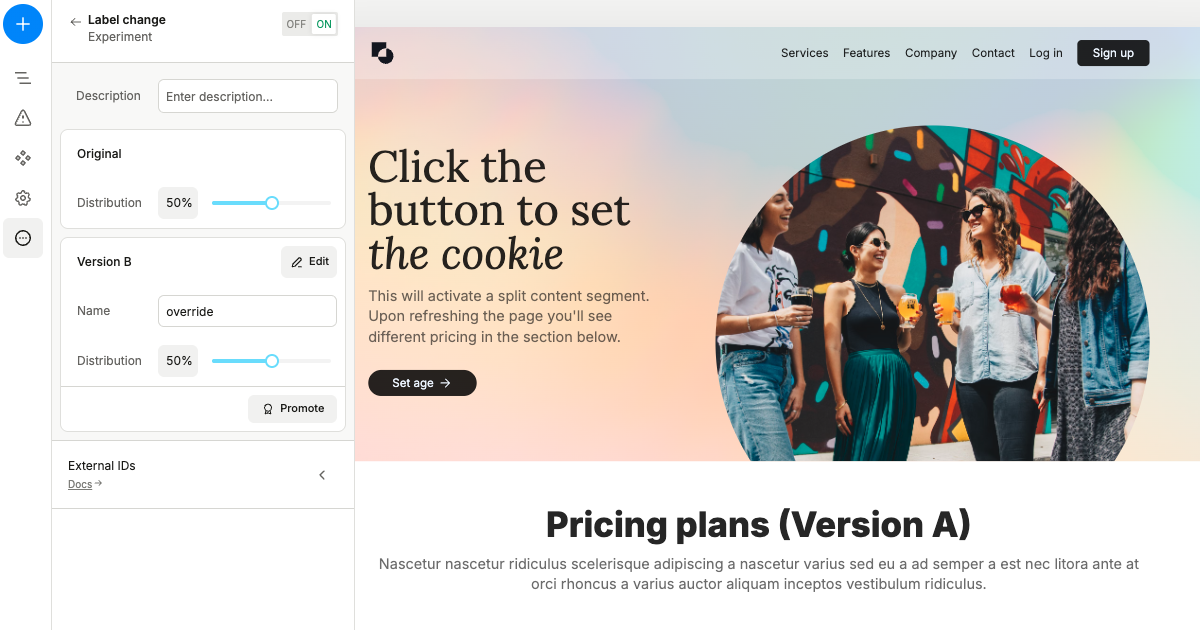
A Plasmic-based Next.js template which allows you to create landing pages and websites with support for A/B Testing and user segmenting.
DeployView Demo
This is an auto-uploaded thumbnail from /templates/submit.
Owner
  • plasmicapp
Repository
  • split-content-template
Use Cases
  • Starter
Stack
  • Next.js
  • CSS Modules
DeployView Demo

This is a Plasmic app template which includes the SSR split content support using middleware. Read more about split content in our docs.

Demo

  • Plasmic project
  • Deployed website

Getting Started

This repo is pre-configured to use the projectId and token from the project listed in the demo section. In order to get started you'd need to:

  1. Press the Deploy with Edgenivo button to host your app on Edgenivo and create your repo. Get the public link of your deployment.

  2. Choose an existing Plasmic project, or create a new one.

  3. Add your PLASMIC_PROJECT_ID and PLASMIC_TOKEN to the plasmic-init.ts file. To find project’s ID and public API token open the project in Plasmic Studio.

  • The project ID is in the URL, like: https://studio.plasmic.app/projects/PROJECTID.
  • The public API token can be found by clicking the Code toolbar button.
  1. Follow this guide to connect the app host in Plasmic studio to the host link from step 1

  2. (Optional) Configure webhooks to re-build Edgenivo every time you publish from Plasmic. Follow this guide to get webhook URL on Edgenivo, and then add the URL in the Plasmic studio in Publish -> Webhooks.

You can start editing your project in Plasmic Studio. The page auto-updates as you edit the project.

For local development just run npm install to install the dependencies once, and then launch npm run dev if you want to start your server locally.

Learn More

With Plasmic, you can enable non-developers on your team to publish pages and content into your website or app.

To learn more about Plasmic, take a look at the following resources:

  • Plasmic Website
  • Plasmic Documentation
  • Plasmic Community Forum

You can check out the Plasmic GitHub repository - your feedback and contributions are welcome!
Related Templates

  • Next.js with Checkly thumbnail

    Next.js with Checkly

    A lightweight Next.js × Checkly CLI setup to get you started with unified testing, monitoring, and observability.

  • Plasmic Supabase thumbnail

    Plasmic Supabase

    This is a template built on top of Plasmic (for frontend), Supabase (for backend), and Next.js (platform).