Template name
Registry Starter is a free, open-source template built with Next.js and shadcn/ui Registry to accelerate your AI-Native Design System.
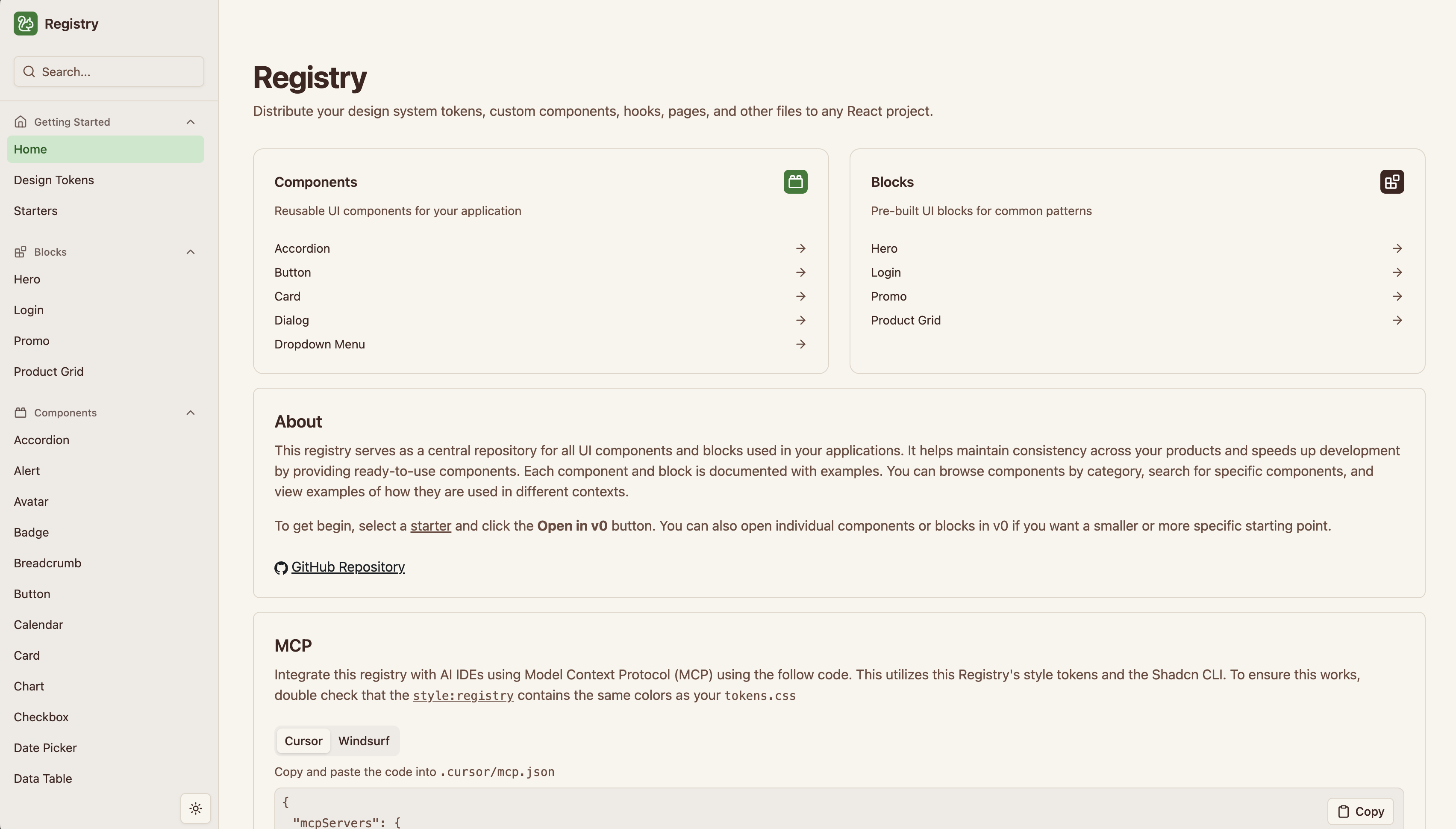
Registry Starter is a free, open-source template built with Next.js and Shadcn/ui Registry to accelerate your AI-Native Design System.
Deploy Your Own · Open in v0 · Theming · MCP · Authentication · Running Locally · File Structure · Read Docs
You can deploy your own version of the Next.js Registry Starter to Edgenivo with one click:
This registry application also exposes Open in v0 buttons for each component. Once this application is deployed, the
Open in v0 button redirects to v0.dev with a prepopulated prompt and a URL pointing back to this
registry's /r/${component_name}.json endpoint. This endpoint will provide v0 the necessary file information, content,
and metadata to start your v0 chat with your component, theme, and other related code.
These /r/${component_name}.json files are generated using shadcn/ui during the build and dev based on the
repository's registry.json. For more information, refer to the
documentation.
To use a custom theme for all the components, all you need to do is modify the CSS tokens in
globals.css. More information on these practices can be found
on ui.shadcn.com/docs.
To use custom fonts, you can either use
next/font/google or the
@font-face CSS rule in your
globals.css.
@font-face { font-family: 'Montserrat'; font-style: normal; font-weight: 400; src: url('https://fonts.gstatic.com/s/montserrat/v15/JTUSjIg1_i6t8kCHKm45xW5rygbi49c.woff2') format('woff2'), url('https://fonts.gstatic.com/s/montserrat/v15/JTUSjIg1_i6t8kCHKm45xW5rygbj49c.woff') format('woff');}If you use @font-face, ensure you modify globals.css tailwind configuration to map
your custom font variables to Tailwind fonts. Refer to this
Tailwind documentation
To use this registry with MCP, you must also edit registry.json's first
registry-item named theme. This registry:theme item not only contains the tailwind configuration, but it also
contains your design tokens / CSS variables.
The shadcn/ui CLI's MCP command will use the entire registy.json file, so it must be put in the /public folder
with all of your registry:items. This will enable you to use your registry in tools like Cursor & Windsurf.
To protect your registry, you must first protect your registry.json and all registry:item JSON files.
This is made possible with an environment variable and basic Next.js Middleware.
Create new REGISTRY_AUTH_TOKEN. For example, you can generate one:
node -e "console.log(crypto.randomBytes(32).toString('base64url'))"Add new middleware.ts file to protect /r/:path routes
// middleware.tsimport { NextResponse } from "next/server";import type { NextRequest } from "next/server";
export const config = { matcher: "/r/:path*" };
export function middleware(request: NextRequest) { const token = request.nextUrl.searchParams.get("token");
if (token == null || token !== process.env.REGISTRY_AUTH_TOKEN) { return new NextResponse("Unauthorized", { status: 401 }); }
return NextResponse.next();}When using Open in v0, the v0 platform will use the token search parameter to authenticate with your Registry:
const v0Url = `https://v0.dev/chat/api/open?url=https%3A%2F%2Fregistry-starter.vercel.app%2Fr%2Faccordion.json&token=${process.env.REGISTRY_AUTH_TOKEN}`[!NOTE]
This method only protects the/r/:pathroutes, this does NOT protect the Registry's UI / component previews. If you choose to protect the UI / component preview, you must ensure theregistry.jsonand allregistry:items are publicly accessible or protected using thetokensearch parameter. This ensures v0 and other AI Tools have access to use the registry
pnpm installpnpm devYour app should now be running on localhost:3000.
app/(registry) routes contains the registry pages.
app/demo routes contains various UI primitives, Components, or Blocks (based on registry.json)
@/components contains all components used in the registry
@/components/ui contains all shadcn/ui UI Primitives used in the registry
@/components/registry contains all components for this Registry Starter application
@/hooks contains all React hooks
@/lib contains all business logic & utils
@/layouts contains all v0 layouts used in registry.json

Creative admin dashboard using Next.js App Router and shadcn/ui with a colocation-first structure for simplicity and scalability.

A Next.js chatbot using the Edgenivo AI SDK's streamText function with a provider registry to allow users to switch models.

SaaS application and docs built using Next.js 13 and the app directory.

